
I built a mint.com replacement
How I used Google Sheets, ChatGPT, and Looker to build my own expense tracker

I used to check mint.com every week to review my finances for years. It helped me reduce debt, see my net worth, and more importantly, for a young Edgar, track my expenses.
Unfortunately, Mint stopped working well for me after it was acquired. I tried different apps, but none of them really gave me what I was looking for without doing extra work. Either the categorization was bad (so I needed to fix and customize it), or the reporting was not what I needed (not much I could do there).
So, for years I didn’t track expenses anymore.
Until a couple of weeks ago.
I decided that if I needed to put effort into creating categories, I might as well explore building a version of the old mint.com app for myself.

Finding the right approach
I tried different ways to do this. I used Google tools, explored Lovable (my fave), and tested a few approaches.
For this solution, I landed on a compromise:
Use my Fidelity app to join all my expenses into one CSV (I had already done this a year ago)
Download the file
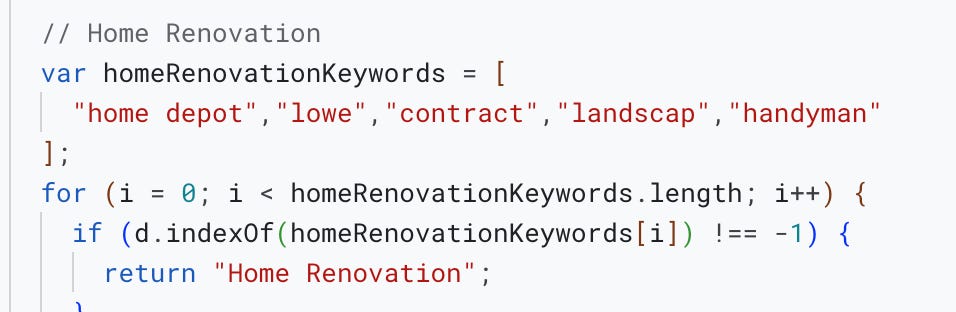
Process it through a script generated using ChatGPT to categorize, clean up, and enhance the data exactly the way I need it
Create the charts I want using Looker (which I had to learn how to use)
And it works!
Why not Lovable?
Why didn’t I build it in Lovable (my preferred building tool)?
Because I was only building this for myself.
The reporting and categories I want are very personal, and I did not want to be responsible for APIs consuming my bank data at this point. I wanted to solve for simplicity.
Google Sheets, Gmail auth, custom building in Looker, and updating the script as my needs change give me all of that, even if I have to compromise on a few extra clicks to run the data.
I’ve been using my solution for a couple of weeks, and I am very happy with the results.
A quick note before the deep dive
For those interested, here is a deep dive into my process. I am sharing this in case you want to recreate it yourself, or if you are just curious about what is possible.
I have built a couple of apps using Lovable and other tools, and it has been nothing short of mind blowing. I started with the job bot, but there are others I have not had a chance to talk about yet.
This exercise was a bit different.
The more I build and create solutions, the more it reminds me of my job as a Customer Success Operations leader.
Start with the business outcome in mind and work backwards.
Just because I can, doesn’t mean I should
AI tools give us a large breadth to tackle problems. With this project, I further realized that just because you are able to do something, it might not always be the best solution for that problem at that time.
This is something I see often in my job as a CS Ops leader.
It was crystallized for me as I was exploring the Plaid API and a pretty cool solution called BanktoSheets (which ended up not supporting my bank).
Right now, downloading a CSV manually every week or every two weeks, pasting it, and clicking one button is good enough. I am not comfortable supporting Plaid and BanktoSheets didn’t quite work.
I like that I am using tools that I already use, like Google Sheets, and that I have an excuse to learn how to use Looker.
Other tools I tested
Google Colab: ran the script beautifully, but still produced a file I had to paste into Google Sheets
Google Gems: couldn’t write to Google Sheets
ChatGPT: couldn’t get it to write to Google Sheets (there is a third-party app in Google’s Marketplace that uses ChatGPT in Sheets, but it didn’t make sense)
APIs (Plaid): explored this path, but it felt too heavy, I didn’t want to be responsible for any potential security risks around OAuth
BanktoSheets: looked promising, but didn’t support one of my banks
Lovable: didn’t spend much time here, it quickly felt too big to build a full app just for a personal project
What did I build
After some deliberation and research, this is where I landed:
Fidelity for the combined transaction data CSV (because I already used it)
ChatGPT to create and refine my rules and script
Google Sheets and its Apps Script
Looker to display the data
Transaction data
I already use Fidelity to aggregate my transactions, but their reporting and categorization are not what I am looking for (this is me being nice).
I’ve had issues like income transactions showing up twice for months, and expenses not being accurately categorized.
But it is a baseline. My expense accounts are already pointing there (there are about four). It is an okay place to start and transform.
I downloaded the transaction CSV and started analyzing what needed to improve.

ChatGPT and Google Sheets
Whenever I start a project, I open a ChatGPT chat box, and if things go as expected, it “graduates” into an actual Project.
I discuss pros, cons, and options. I used ChatGPT to explore different paths and do some research, which is how I found the BanktoSheets extension.
Once I settled on using Google Sheets and Apps Script, I went deep into creating my transaction categorization logic.
Some of the rules I needed to figure out:
Ignore duplicate income transactions that look exactly the same on the same day
Categorize all fees into one category
Categorize Uber Eats under dining, not transportation
Treat Venmo as home expenses unless “gift” appears in the description
Classify Whole Foods, Trader Joe’s, and Costco as groceries
Normalize the mortgage company name
Create an original category after processing to compare old vs. new categories
Create an exclusion flag (important for reporting)
Group babysitters, activities, pre-K, summer camps, etc. as Kids Expenses
Now I am getting places.
I tested the script a couple of times, and after a few failures, it worked like a charm. I had never built nor run a script before, nor did I know prior to this that Google Sheets had an Apps Script builder. It makes sense! I just hadn’t had the need yet.
It is incredibly powerful that I can build this as a script and take advantage of Google’s infrastructure. They really have this down.
Looker
The last piece of the puzzle.
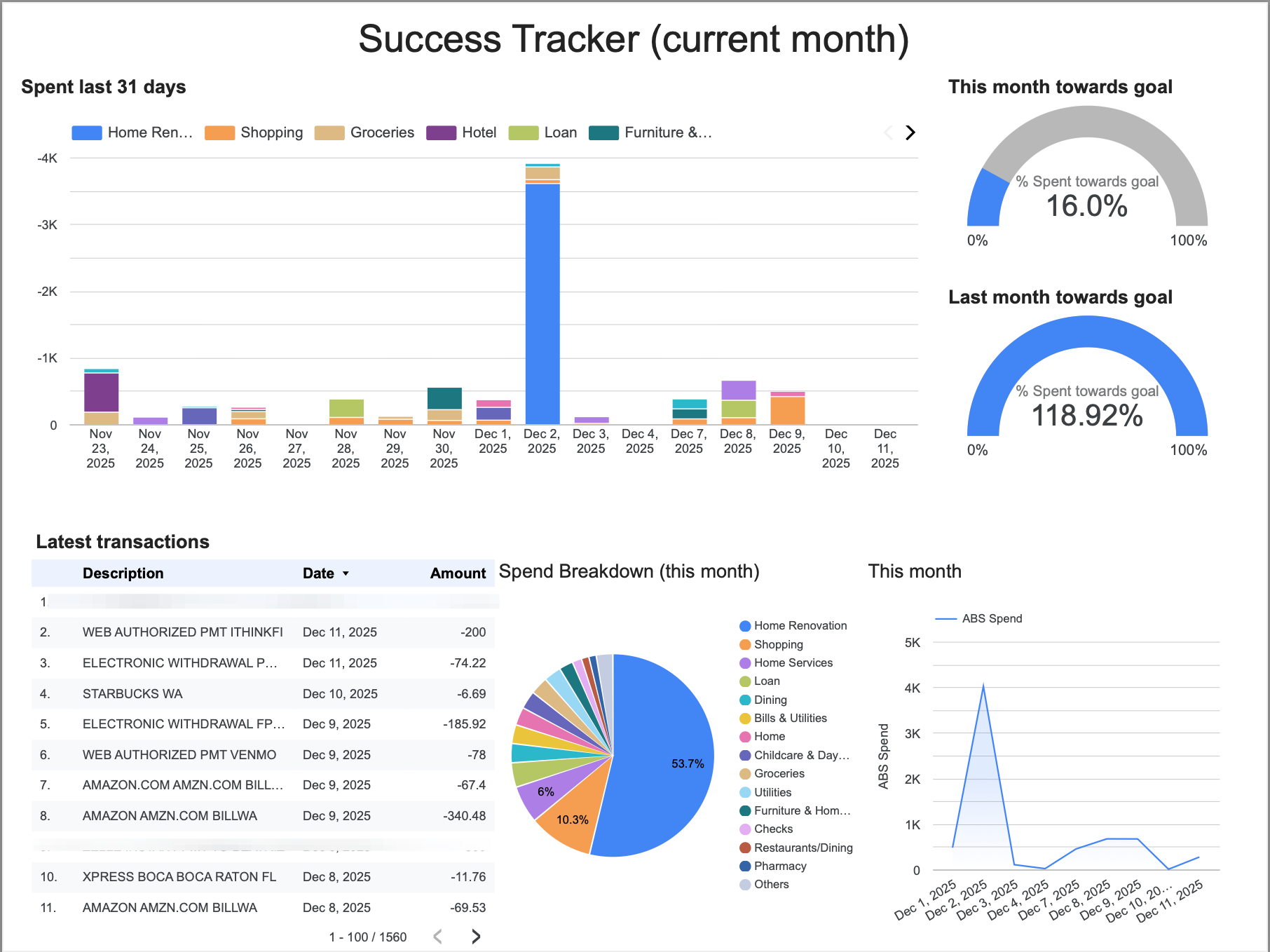
This works because of Google’s extraordinary tooling. Just like Apps Script in Google Sheets, I learned about Looker from Brian LaFaille (shoutout to him!) many years ago, but never used it until now.
It took me a few tries for it to click…But wow, what a tremendously powerful tool.
It wasn’t hard because it reminded me of how to build reporting in Gainsight and Salesforce. The learning curve was not steep, and I was able to get a bit fancy quickly.
All I had to do was set the source data as the Google Sheet where I load my processed transaction data.
Once I set up the spreadsheet and run the script, my Looker dashboard updates automatically.
Final thoughts
I have many, but here are a few that have not left my head after weeks:
Pre-GenAI, I would not have had the patience (or knowledge) to do this by myself. Getting to this outcome - my own expense tracker - was only possible because I could use ChatGPT to generate the script and because I already had experience building in tools like Looker.
With this project, I learned how to use Google Sheets Apps Script and Looker. The learning I have done since I started building with AI is underrated. I keep accruing tools in my toolbox to solve problems.
I have been annoyed for a while that I did not have the visibility I wanted into my expense habits - but it was never a burning need. AI is changing what qualifies as a need by making things possible. This took me a few hours one night, from concept to build.
The way I think about building and scaling is changing:
ChatGPT for day-to-day problem solving, questions, and solutioning, like my Sancho Panza to Don Quijote, enabling me to charge toward windmills
Tools like Lovable and Google Studio make building software easier, some might say commoditized. Building software for $25 a month to solve real problems is incredibly valuable, even if I am only solving my own
Scale increasingly looks like agents that complete specific tasks. I’ve built one already (more on that later), and I need to explore this further
Some might read this as bullish on Google in the AI space. The fact that I do not have to worry about user management, databases, logic, or visualizations to build something small for myself is magical. It was not my intent to
addmake a bull case, but here we are.Not everyone can do this, sorting through APIs, creating reports in Looker, being comfortable with AppScripts. I can’t help to realize how much working with enterprise technologies has helped me to make sense of the AI stack. Revenue and Customer Success Operations humans can quickly skill up.
As someone who is not a software developer, enterprise SaaS tools have helped me build solutions for the companies, and customers I work(ed) with. AI tools feel like a giant next step from SaaS tools…but they are not mutually exclusive.
I would not be honest if I said I had not thought about a path to a full application here. One where users can create their own version of the Google Sheets scripts using text (writing a prompt), analyze their transaction data interactively, and be guided through building categorization logic. We could offer out-of-the-box reporting, advanced customization, and even a community where people upvote reports users can deploy. APIs like Plaid can handle a lot of the transaction data challenges. It is a world of possibilities.
AI opens the door to a different way of interacting with software, a different expectation of what it can do, and reimagining existing tooling with AI native capabilities.
What strikes me most is how much closer building something like my own mint.com “replacement” feels today for lots of us
Maybe software will finally truly eat the world.